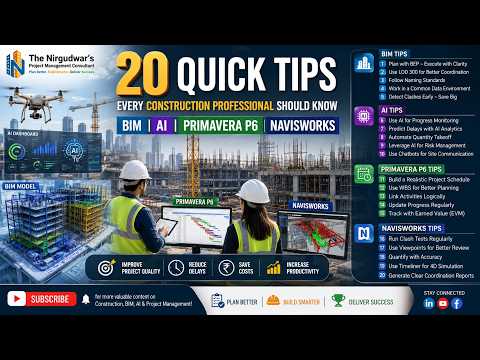
The construction industry is undergoing a digital revolution. To stay competitive, professionals must move beyond traditional methods and embrace the power of Building Information Modeling (BIM), Artificial Intelligence (AI), and advanced scheduling tools. Whether you are a project manager or a BIM coordinator, mastering these technologies is no longer optional—it is essential for project success.
The Role of Technology in Modern Construction
Modern construction demands more than just hammers and nails; it requires data-driven decision-making. By integrating AI and BIM into your workflow, you can predict potential roadblocks before they happen on-site. Tools like Primavera P6 help manage complex timelines, while AI-driven analytics provide insights that human observation might miss. However, the true "magic" happens during the coordination phase, where models from various disciplines come together to ensure a clash-free build.
Enhancing Coordination with Autodesk Navisworks
At the heart of any successful BIM workflow is effective project review and coordination. Autodesk Navisworks stands out as the industry standard for federating models and running advanced clash detection. By utilizing this software, teams can combine architectural, structural, and MEP data into a single environment. This holistic view allows stakeholders to identify interferences early, drastically reducing the cost of rework and material waste.
Beyond simple clash detection, Autodesk Navisworks enables 4D simulation, allowing project managers to visualize the construction sequence over time. This ensures that the schedule created in Primavera P6 aligns perfectly with the physical reality of the site.
20 Quick Tips for Success
To help you navigate this complex landscape, here are some summarized expert tips for your next project: 1. Automate the Mundane: Use AI tools to handle repetitive data entry. 2. Standardize Naming Conventions: Ensure every team member follows the same BIM standards to avoid confusion. 3. Run Regular Clash Tests: Don’t wait until the end of the design phase; use Autodesk Navisworks weekly to catch issues early. 4. Integrate Schedules: Link your 3D models with your project timeline for better resource management. 5. Continuous Learning: The software updates frequently—staying updated on the latest features in Navisworks and AI integrations is key to career growth.
Conclusion
Embracing these 20 expert tips will not only improve your efficiency but also elevate the quality of your construction projects. By leveraging the power of BIM, AI, and specialized software like Navisworks, you can ensure that your projects are delivered on time, within budget, and to the highest professional standards. The future of construction is digital—are you ready to lead the way?


