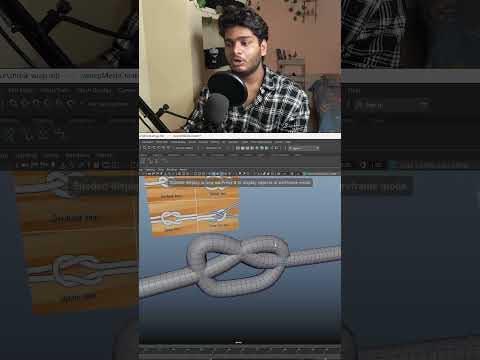
Creating high-quality 3D props is a fundamental skill for any environment artist. While intricate objects like knotted ropes might seem daunting to model manually, Autodesk Maya offers a suite of powerful, non-destructive tools that make the process both efficient and "game-ready." Whether you are building a medieval dock or a modern construction site, mastering rope physics and geometry is essential for immersion.
Defining the Path with Curves
The secret to a clean rope knot starts with a solid foundation. Instead of extruding faces from a cylinder, begin by using EP or Bezier curves to "draw" the path of your rope. This allows you to visualize the knot’s flow and tension before any heavy geometry is generated. The flexibility of curves means you can adjust the knot's complexity without the headache of fixing distorted polygons later.
Leveraging Sweep Mesh for Instant Volume
Once your curve is positioned, the Autodesk Sweep Mesh tool becomes the star of the show. With a single click, you can turn a simple line into a detailed 3D cylinder. The Sweep Mesh creator provides a dedicated attribute editor where you can adjust the number of sides, the scale profile, and—most importantly for ropes—the rotation and twist. By increasing the twist value, you can simulate the braided look of real hemp or nylon rope instantly, saving hours of manual modeling time.
Realism Through the Shrink Wrap Deformer
One of the biggest challenges in 3D modeling is making objects look like they are interacting naturally. A rope knot shouldn’t just float; it should hug the object it is tied to. This is where the Shrink Wrap deformer comes into play. By projecting your rope geometry onto a target mesh, you can ensure the knot sits tightly against surfaces, providing that realistic "cinched" appearance required for high-end game assets.
Optimization for Game Engines
Efficiency is key in game development. By using this curve-based workflow in Autodesk Maya, you maintain a non-destructive pipeline. You can lower the subdivision levels on your Sweep Mesh to create a low-poly proxy for your game engine, while keeping the high-poly version for baking normals. This ensures your rope looks detailed and tactile without sacrificing the performance of your real-time environment.
By combining curves, Sweep Mesh, and deformers, you transform a complex task into a repeatable, professional workflow. Experiment with these settings today to bring a new level of detail to your 3D scenes!


