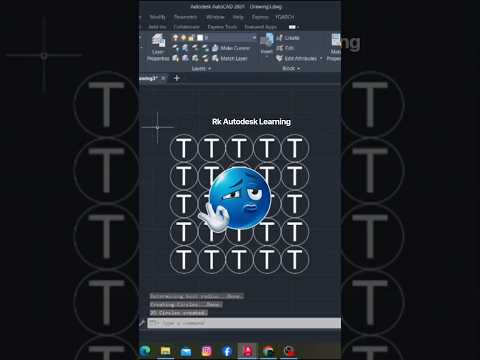
Whether you are a seasoned drafter or just getting started with Autodesk AutoCAD, efficiency is the key to creating clean, professional technical drawings. One common task designers face is highlighting or grouping annotations by placing shapes around text.
Manually drawing circles around every piece of text and aligning them properly can be frustrating and time-consuming. Fortunately, there is a powerful built-in command that automates this entire process in seconds: TCIRCLE.
What is the TCIRCLE Command?
The TCIRCLE command is one of the best hidden gems in the Autodesk Express Tools library. It allows you to automatically enclose single-line text, multiline text (MTEXT), or attribute definitions inside circles, slots, or rectangles.
Instead of manually scaling shapes to fit varying text lengths, TCIRCLE dynamically calculates the bounding box of your text and draws perfectly proportioned shapes around it.
Step-by-Step Guide: How to Enclose Text in AutoCAD
Using this command is quick and straightforward. Follow these simple steps to instantly clean up your drawing annotations:
- Type the Command: Enter
TCIRCLE(orEXPTBLTCIRCLE) into your command line and press Enter. - Select Text: Click on the text objects you wish to enclose, then press Enter.
- Set the Distance Offset: Enter an offset factor (the default is
0.35). This determines the space between the text and the surrounding boundary. - Choose Your Shape: Select your desired enclosure shape from the command prompt:
- Circles: Best for item numbers or single-character tags.
- Slots: Great for longer labels and callouts.
- Rectangles: Ideal for keynotes and titles.
- Set the Enclosure Size: Choose whether you want the size to be Constant (all shapes are the same size based on the largest text) or Variable (each shape adjusts specifically to its individual text length).
Why You Should Use TCIRCLE in Your Workflow
By leveraging smart commands like TCIRCLE in your Autodesk drafting workflow, you save precious time and eliminate repetitive manual alignment. It ensures uniform formatting across all your project sheets, giving your deliverables a clean, standardized look.
Give the TCIRCLE command a try in your next drafting session and experience a faster, more streamlined annotation process!


