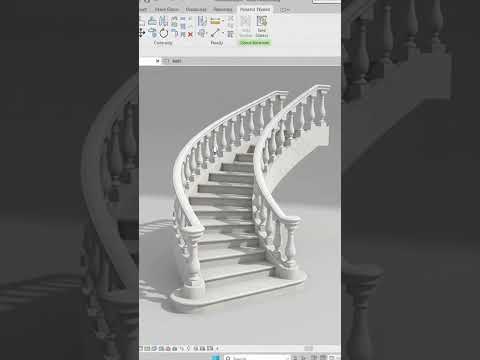
Classical architecture is defined by its timeless elegance and intricate details. One of the most recognizable features of this style is the classical baluster railing, which adds a touch of sophistication to balconies, staircases, and terraces. For architects and designers, mastering these details in a digital environment is crucial for high-quality visualization. In this guide, we will explore how to create a beautiful, professional classical railing design using Autodesk Revit.
The Importance of Detailed Railing Design
In the world of Building Information Modeling (BIM), precision is everything. While standard railings serve a functional purpose, custom classical balusters elevate the aesthetic value of your project. Using Autodesk Revit, you have the power to move beyond generic presets and craft specific profiles that match historical or luxury residential requirements.
Step 1: Creating the Baluster Profile
The secret to a stunning classical railing lies in the profile of the baluster itself. To begin, you must create a "Baluster Post" family. Instead of a simple cylinder, use the Revolve tool to trace the traditional curves—the base, the belly (bolster), and the neck—of a classical stone or wood baluster. Once your profile is sculpted, load it into your main project.
Step 2: Configuring the Railing System in Autodesk Revit
Once your custom baluster family is ready, you need to integrate it into a railing system. Navigate to the Railing Type properties and access the "Baluster Placement" settings. Here, you can specify your new custom family as the main pattern.
To achieve a realistic look, pay close attention to the spacing (the "Break Pattern At") and how the balusters meet the top and bottom rails. Autodesk Revit allows you to adjust the offsets precisely, ensuring that each baluster sits perfectly on the tread or the floor slab.
Step 3: Refining the Top Rail and Materials
No classical railing is complete without a robust top rail. Choose a profile that complements the weight of your balusters—typically a handrail with a wider, molded top. Finally, apply high-quality materials such as white marble, limestone, or polished oak to bring the design to life in your renderings.
Conclusion
Designing classical elements doesn't have to be a complex chore. By leveraging the parametric power of the software, you can create reusable families that bring historical charm to modern workflows. With these steps, your next project will showcase the professional level of detail that only a custom-designed railing can provide.


