Have you ever been in a BIM coordination meeting where half the time is spent awkwardly orbiting around a complex 3D model just to locate a single issue? It drains productivity, frustrates team members, and drags out meetings unnecessarily. Thankfully, streamlining BIM coordination in Autodesk Navisworks comes down to mastering one fundamental feature: Saved Viewpoints.
What Are Saved Viewpoints?
Saved Viewpoints in Autodesk Navisworks act as visual camera presets that capture specific angles, zoom levels, section cuts, and element visibility states within your project model. Instead of manually navigating through massive architectural, structural, and MEP models during a live meeting, a single click on a saved viewpoint instantly takes you to the exact area of concern.
Key Benefits for BIM Coordination Meetings
- Eliminate Wasted Time: Stop wasting precious minutes panning, zooming, and flying through models. Jump straight to the clash or area under discussion.
- Maintain Team Focus: By preparing viewpoints centered on specific design discrepancies beforehand, you keep all stakeholders focused on problem-solving rather than searching.
- Enhance Communication: Viewpoints can be linked to clash reports, comments, and redlines, ensuring seamless context sharing across all disciplines.
Best Practices for Managing Viewpoints
To get the most out of your setup, implement these simple tips:
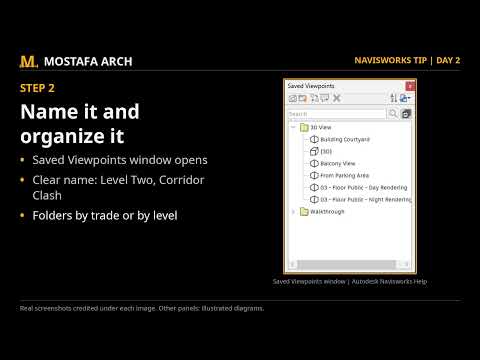
- Use Structured Folder Hierarchies: Organize your viewpoints by building levels, disciplines (Architectural, Structural, MEP), or specific coordination meeting dates.
- Adopt Clear Naming Conventions: Label viewpoints with clear, descriptive titles (e.g.,
L02_Duct_Beam_Clash_04) rather than default names likeViewpoint 1. - Capture Visibility & Color Overrides: Saved Viewpoints preserve hidden elements and highlight colors, making complex spatial issues much easier to interpret at a glance.
Final Thoughts
By implementing these simple workflow habits in Autodesk Navisworks, you can transform chaotic model reviews into sharp, efficient coordination sessions. Stop navigating in circles during meetings—save your viewpoints in advance and drive faster project approvals!


