000

Index Labels

Visual Scripting the Data-Oriented Way

.
The BitSquid engine has two separate scripting systems. The first is Lua. The entire engine is exposed to Lua in such a way that you can (and are encouraged to) write an entire game in Lua without touching the C++ code at all.

The second system, which is the focus of this post, is a visual scripting system that allows artists to add behaviors to levels and entities. We call this system Flow.

Lua and Flow have different roles and complement each other. Lua allows gameplay programmers to quickly test designs and iterate over gameplay mechanics. Flow lets artists enrich their objects by adding effects, destruction sequences, interactivity, etc. When the artists can do this themselves, without the help of a programmer, they can iterate much faster and the quality is raised.

Flow uses a pretty standard setup with nodes representing actions and events.  Black links control how events cascade through the graph causing actions to be taken. Blue links represent variables that are fed into the flow nodes:


In this graph, the green nodes represent events and the red node represents an action. The yellow node is an action implemented in Lua. The gameplay programmers can set up such actions on a per-project basis and make them available to the artists.

Each unit (= entity) type can have its own flow graph, specifying that unit's behavior, e.g. an explosion sequence for a barrel. There is also a separate flow graph for the entire level that the level designers can use to set up the level logic.

Since Flow will be used a lot I wanted to implement it as efficiently as possible, both in terms of memory and performance. This means that I don't use a standard object-oriented design where each node is a separate heap-allocated object that inherits from an abstract Node class with a virtual do_action() method. That way lies heap allocation and pointer chasing madness.

Sure, we might use such a design in the editor, where we don't care about performance and where the representation needs to be easy to use, modifiable, stable to version changes, etc. In the runtime, where the graph is static and compiled for a particular platform, we can do a lot better.

(This is why you should keep your editor (source) data format completely separate from your in-game data format. They have very different requirements. One needs to be dynamic, multi-platform and able to handle file format version changes. The other is static, compiled for a specific platform and does not have to care about versioning -- since we can just recompile from source if we change the format. If you don't already -- just use JSON for all your source data, and binary blobs for your in-game data, it's the only sane option.)

The runtime data doesn't even have to be a graph at all. There are at least two other options:

  • We could convert the entire graph into a Lua program, representing the nodes as little snippets or functions of Lua code. This would be a very flexible approach that would be easy to extend. However, I don't like it because it would introduce significant overhead in both CPU and memory usage.
  • We could "unroll" the graph. For each possible external input event we could trace how it flows through the graph and generate a list of triggered actions as a sort of "bytecode". The runtime data would then just be a bytecode snippet for each external event. This has the potential of being very fast but can be complicated by nodes with state that may cause branching or looping. Also, it could potentially use a lot of extra memory if there are many shared code paths.

So I've decided to use a graph. But not a stupid object-oriented graph. A data-oriented graph, where we put the entire graph in a single blob of cohesive memory:
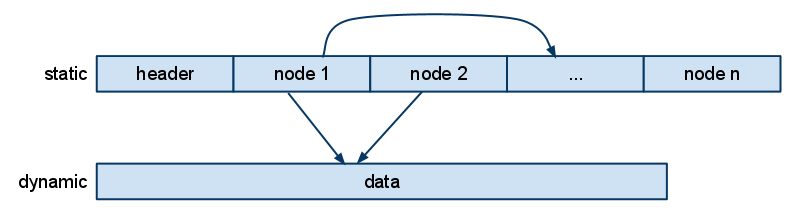

Oh, these blobs, how I love them. They are really not that complicated. I just concatenate all the node data into a single memory chunk. The data for each node begins with a node type identifier that lets me switch on the node type and do the appropriate action for each node. (Yes, I'll take that over your virtual calls any day.) Pointers to nodes are stored as offsets within the blob. To follow a pointer, just add the offset to the blob's start address, cast the pointer to something useful and presto!

Yes, it is ok to cast pointers. You can do it. You don't have to feel bad about it. You know that there is a struct ParticleEffectNode at that address. Just cast the pointer and get it over with.

The many nice things about blobs with offsets deserve to be repeated:

  • We can allocate the entire structure with a single memory allocation. Efficient! And we know exactly how much memory it will use.
  • We can make mem-copies of the blob without having to do any pointer patching, because there are no pointers, only offsets.
  • We can even DMA these copies over to a SPU. Everything is still valid.
  • We can write the data to disk and read it back with a single call. No pointer patching or other fixups needed.

In fact, doesn't this whole blob thing look suspicously like a file format? Yes! That is exactly what it is. A file format for memory. And it shouldn't be surprising. The speed difference between RAM and CPU means that memory is the new disk!

If you are unsure about how to do data-oriented design, thinking "file formats for memory" is not a bad place to start.


Note that there is a separate blob for dynamic data. It is used for the nodes' state data, such as which actor collided with us for a collision event (the blue data fields in the flow graph). We build that blob in the same way. When we compile the graph, any node that needs dynamic data reserves a little space in the dynamic blob and stores the offset to that space from the start of the dynamic block.

When we clone a new entity, we allocate a new dynamic data block and memcopy in the template data from the dynamic data block that is stored in the compiled file.

Sharing of dynamic data (the blue links in the graph) is implemented by just letting nodes point to the same offset in the dynamic data blob.

Since we are discussing performance, I should perhaps also say something about multithreading. How do we parallelize the execution of flow graphs?

The short answer: we don't.

The flow graph is a high level system that talks to a lot of other high level systems. A flow graph may trigger an effect, play a sound, start an animation, disable a light, etc, etc. At the same time there isn't really any heavy CPU processing going on in the flow graph itself. In fact it doesn't really do anything other than calling out to other systems. Multithreading this wouldn't gain a lot (since the compute cost is low to begin with) and add significant costs (since all the external calls would have to be synchronized in some way).

Blog Archive

Labels

.NET Programming 2D Drafting 3D Animation 3D Art 3D Artist 3D design 3D effects 3D Engineering 3D Materials 3D Modeling 3D models 3D presentation 3D Printing 3D rendering 3D scanning 3D scene 3D simulation 3D Sketch Inventor 3D Texturing 3D visualization 3D Web App 3ds Max 4D Simulation ACC Adaptive Clearing adaptive components Add-in Development Additive Manufacturing Advanced CAD features Advanced Modeling AEC Technology AEC Tools affordable Autodesk tools AI AI animation AI Assistance AI collaboration AI Design AI Design Tools AI Experts AI for Revit AI Guide AI in CAD AI in CNC AI in design AI in Manufacturing AI in Revit AI insights AI lighting AI rigging AI Tips AI Tools AI troubleshooting AI workflow AI-assisted AI-assisted rendering AI-enhanced Animation animation pipeline animation tips Animation workflow annotation AR architectural design architectural modeling architectural preservation architectural visualization Architecture architecture design Architecture Engineering Architecture Firm Architecture Productivity architecture software architecture technology Architecture Workflow Arnold Renderer Arnold Shader Artificial Intelligence As-Built Model Asset Management augmented reality AutoCAD AutoCAD advice AutoCAD API AutoCAD Basics AutoCAD Beginner AutoCAD Beginners AutoCAD Civil 3D AutoCAD Civil3D AutoCAD commands AutoCAD efficiency AutoCAD Expert Advice AutoCAD features AutoCAD File Management AutoCAD Layer AutoCAD Layers AutoCAD learning AutoCAD print settings AutoCAD productivity AutoCAD Teaching AutoCAD Techniques AutoCAD tips AutoCAD tools AutoCAD training. AutoCAD tricks AutoCAD Tutorial AutoCAD workflow AutoCAD Xref Autodesk Autodesk 2025 Autodesk 2026 Autodesk 3ds Max Autodesk AI Autodesk AI Tools Autodesk Alias Autodesk AutoCAD Autodesk BIM Autodesk BIM 360 Autodesk Certification Autodesk Civil 3D Autodesk Cloud Autodesk community forums Autodesk Construction Cloud Autodesk Docs Autodesk Dynamo Autodesk features Autodesk for Education Autodesk Forge Autodesk FormIt Autodesk Fusion Autodesk Fusion 360 Autodesk help Autodesk InfraWorks Autodesk Inventor Autodesk Inventor Frame Generator Autodesk Inventor iLogic Autodesk Knowledge Network Autodesk License Autodesk Maya Autodesk mistakes Autodesk Navisworks Autodesk news Autodesk plugins Autodesk productivity Autodesk Recap Autodesk resources Autodesk Revit Autodesk Software Autodesk support ecosystem Autodesk Takeoff Autodesk Tips Autodesk training Autodesk tutorials Autodesk update Autodesk Upgrade Autodesk Vault Autodesk Video Autodesk Viewer Automated Design Automation Automation Tutorial automotive design automotive visualization Backup Basic Commands Basics Batch Plot Beginner Beginner Tips beginner tutorial beginners guide Big Data BIM BIM 360 BIM Challenges BIM collaboration BIM Compliance BIM Coordination BIM Data BIM Design BIM Efficiency BIM for Infrastructure BIM Implementation BIM Library BIM Management BIM modeling BIM software BIM Standards BIM technology BIM tools BIM Trends BIM workflow Block Editor Block Management Block Organization Building Design Software Building Maintenance building modeling Building Systems Building Technology ByLayer CAD CAD API CAD assembly CAD Automation CAD Blocks CAD CAM CAD commands CAD comparison CAD Customization CAD Data Management CAD Design CAD errors CAD Evolution CAD File Size Reduction CAD Integration CAD Learning CAD line thickness CAD management CAD Migration CAD mistakes CAD modeling CAD Optimization CAD plugins CAD Productivity CAD Rendering CAD Security CAD Skills CAD software CAD software 2026 CAD software training CAD standards CAD technology CAD Tips CAD Tools CAD tricks CAD Tutorial CAD workflow CAM car design software Case Study CEO Guide CGI design Character Rig cinematic lighting Civil 3D Civil 3D hidden gems Civil 3D productivity Civil 3D tips civil design software civil engineering Civil engineering software Clash Detection Class-A surfacing clean CAD file cleaning command client engagement Cloud CAD Cloud Collaboration Cloud design platform Cloud Engineering Cloud Management Cloud Storage Cloud-First CNC CNC machining collaboration command abbreviations Complex Renovation concept car conceptual workflow Connected Design construction Construction Analytics Construction Automation Construction BIM Construction Cloud Construction Planning Construction Scheduling Construction Technology contractor tools Contractor Workflow Contraints corridor design Cost Effective Design cost estimation Create resizable blocks Creative Teams CTB STB Custom visual styles Cutting Parameters Cybersecurity Data Backup data management Data Protection Data Reference Data Security Data Shortcut Design Automation Design Career Design Collaboration Design Comparison Design Coordination design efficiency Design Engineering Design Hacks Design Innovation design optimization Design Options design productivity design review Design Rules design software design software tips Design Technology design tips Design Tools Design Workflow design-to-construction Designer Designer Tools Digital Art Digital Assets Digital Construction Digital Construction Technology Digital Content Digital Design Digital engineering digital fabrication Digital Manufacturing digital marketing digital takeoff Digital Thread Digital Tools Digital Transformation Digital Twin Digital Twins digital workflow dimension dimensioning Disaster Recovery drafting Drafting Efficiency Drafting Shortcuts Drafting Standards Drafting Tips Drawing Drawing Automation drawing tips Dref Dynamic Block Dynamic Block AutoCAD Dynamic Blocks Dynamic doors Dynamic windows Dynamo Dynamo automation early stage design eco design editing commands Electrical Systems Emerging Features Energy Analysis energy efficiency Engineering Engineering Automation engineering data Engineering Design Engineering Innovation Engineering Productivity Engineering Skills engineering software Engineering Technology engineering tools Engineering Tools 2025 Engineering Workflow Excel Export Workflow Express Tools External Reference facial animation Facial Rigging Facility Management Families Fast Structural Design Field Documentation File Optimization File Recovery Flame flange tips flat pattern Forge Development Forge Viewer FreeCAD Fusion 360 Fusion 360 API Fusion 360 tutorial Future of Design Future Skills Game Development Gamification Generative Design Geospatial Data GIS Global design teams global illumination grading optimization green building Green Technology Grips Handoff HDRI health check Healthcare Facilities heavy CAD file Heavy CAD Files heritage building conservation hidden commands Hospital Design HVAC HVAC Design Tools HVAC Engineering Hydraulic Modeling IK/FK iLogic Import Workflow Industry 4.0 Infrastructure infrastructure design Infrastructure Monitoring Infrastructure Planning Infrastructure Technology InfraWorks innovation Insight intelligent modeling Interactive Design interactive presentation Interior Design Inventor Inventor API Inventor Drawing Template Inventor Frame Generator Inventor Graphics Issues Inventor IDW Inventor Tips Inventor Tutorial IoT ISO 19650 joints Keyboard Shortcuts keyframe animation Keyframe generation Landscape Design Large Projects Laser Scan Layer Management Layer Organization Learn AutoCAD Legacy CAD Licensing light techniques Lighting and shading Lighting Techniques Linked Models Machine Learning Machine Learning in CAD Machine Optimization Machining Efficiency maintenance command Management manufacturing Manufacturing Innovation Manufacturing Technology Mapping Technology marketing visuals Material Creation Maya Maya character animation Maya lighting Maya Shader Maya Tips Maya tutorial measurement Mechanical Design Mechanical Engineering Media & Entertainment MEP Modeling Mesh-to-BIM Metal Structure modal analysis Model Management Model Optimization Modeling Secrets Modular Housing Motion capture motion graphics motion simulation MotionBuilder Multi Office Workflow Multi-User Environment multileader Navisworks Navisworks Best Practices Net Zero Design ObjectARX .NET API Open Source CAD Organization OVERKILL OVERKILL AutoCAD Page Setup Palette Parametric Components parametric design parametric family Parametric Modeling particle effects particle systems PDF PDM system Personal Brand Phasing PlanGrid Plot Settings Plot Style Plot Style AutoCAD Plotting Plugin Tutorial Plumbing Design point cloud Portfolio Post Construction Post-Processing Practice Drawing preconstruction workflow predictive analysis predictive animation Predictive Maintenance Predictive rigging Prefabrication Presentation-ready visuals Printing Printing Quality Procedural animation procedural motion Procedural Rig Procedural Textures Product Design Product Development product lifecycle product rendering Productivity productivity tools Professional 3D design Professional CAD Professional Drawings professional printing Professional Tips Project Documentation project efficiency project management Project Management Tools Project Visualization PTC Creo PURGE PURGE AutoCAD Rail Transit Rapid Prototyping realistic rendering ReCap Redshift Shader reduce CAD file size Render Render Passes Render Quality Render Settings Rendering rendering engine Rendering Engines Rendering Optimization rendering software Rendering Tips Rendering Workflow RenderMan Renewable Energy Renovation Project Renovation Workflow Reports Resizable Block restoration workflow Revit Revit add-ins Revit API Revit automation Revit Best Practices Revit Collaboration Revit Documentation Revit Family Revit integration Revit MEP Revit Performance Revit Phasing Revit Plugins Revit Scripting Revit skills Revit Standards Revit Template Revit Tips Revit tutorial Revit Workflow Ribbon Rigging robotics ROI Scale Autodesk Schedules screen Sculpting Secure Collaboration Sensor Data Shader Networks Sheet Metal Design Sheet Metal Tricks Sheet Set Manager shortcut keys Shortcuts Siemens NX Simulation simulation tools Sketch Sketching Tricks Small Firms Smart Architecture Smart Block Smart Building Design Smart City Smart Design Smart Engineering Smart Factory Smart Infrastructur Software Compliance software ecosystem Software Management Software Trends software troubleshooting Software Update Solar Energy Solar Panels SolidWorks Startup Design static stress Steel Structure Design Structural Optimization subscription model Subscription Value Surface Modeling sustainability sustainable design Sustainable Manufacturing system performance T-Spline team training guide Technical Drawing technical support Template Setup text style Texture Mapping Texturing thermal analysis Time Management time saving tools Title Blocks toolbar Toolpath Optimization Toolpaths Topography Troubleshooting Tutorial Tutorials urban planning User Interface (UI) UV Mapping UV Unwrap V-Ray Vault Best Practices Vault Lifecycle Vault Mistakes Vector Plotting vehicle modeling VFX Viewport configuration Virtual Environments virtual reality visual effects visualization workflow VR VR Tools VRED Water Infrastructure Water Management Weight Painting What’s New in Autodesk Wind Energy Wind Turbines Workbook workflow Workflow Automation workflow efficiency Workflow Optimization Workflow Tips Worksets Worksharing Workspace XLS Xref Xrefs เขียนแบบ